How to Fake the Time on next.js Server for E2E Tests
Table of Contents
Motivation
You want to test e2e a javascript \ typescript based server that performs time based tasks
In my use case, I am developing a coupon system for my online courses web site and I want to create a sale day every Wednesday
So the question is how to set the time on the server once for Wednesady and once for non Wednesday and perform tests
Design
The design must answer a few questions- How to fake time on the server --> use sinon.js - fake time package
- How to tell the server to change time and how to pass the desired time --> use REST API using POST and body e2e fake time API : e2e-fake-server-time.ts
- How to make sure that the fake time will not be invoked on production and will be invoked only for localhost --> add protection in code and test
- Which test runner invokes the e2e test and unit test --> vitest
- Which tool to use for e2e test --> puppeteer
UI
By observing these UI changes, we can verify that the server-side time injection correctly triggers time-dependent business logic, such as the Wednesday sale flag, across the entire application stack.
regular
This is the true time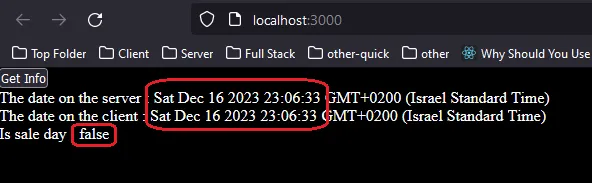
fake time to Wednesday
Notice isSaleDay is true because it is Wednesday (1702458733000 ms from 1970)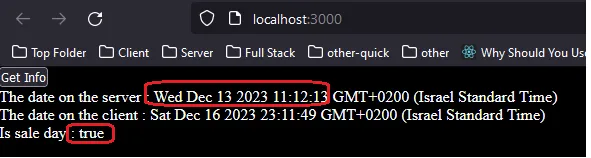
fake time to Thursday
Notice isSaleDay is false because it is not Wednesday (1702549920000 ms from 1970)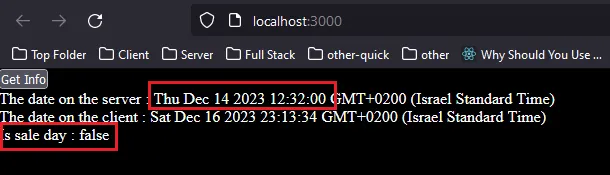
Fake API
The core of this solution is a dedicated internal endpoint that leverages sinon.js to intercept the global Date object, allowing for precise temporal control without modifying business logic.
Source code
// Next.js API route support: https://nextjs.org/docs/api-routes/introduction
import IServerFakeTime from "@/types/i-server-fake-time";
import { isProduction } from "@/utils/utils";
import type { NextApiRequest, NextApiResponse } from "next";
/*
 Use this import; otherwise, I get an error from react, thinking useFakeTimers is a custom hook.
*/
import sinon from "sinon";

export default function handler(req: NextApiRequest, res: NextApiResponse) {
  if (req.method == "POST") {
    const { serverFakeTimeMs } = req.body as IServerFakeTime;

    // -- We do not want this on production so protect production from mistakes ........
    const isLocalhost = req.headers.host?.includes("localhost");

    if (!isProduction() && isLocalhost) {
      sinon.restore(); // this is required; otherwise, you get an error on setting twice
      sinon.useFakeTimers({
        toFake: ["Date"],
        now: new Date(serverFakeTimeMs),
      });
    }

    res.status(200).json({ date: new Date() });
  } else {
    // Handle other HTTP methods if needed
    res.status(405).json({ error: "Method Not Allowed" });
  }
}
How to protect yourself
In general, you do not want to invoke /api/e2e-fake-server-time, so how to protect yourself?- The fake timer package - sinon is installed as a dev dependency and thus can not appear in production
- Add code that does not allow the API to run on production, and using a host other than localhost
- Create a separate project for the e2e test and add e2e-fake-server-time.ts only there
- Any developer should know what he is doing; if you need this for e2e, simply don't use it in production
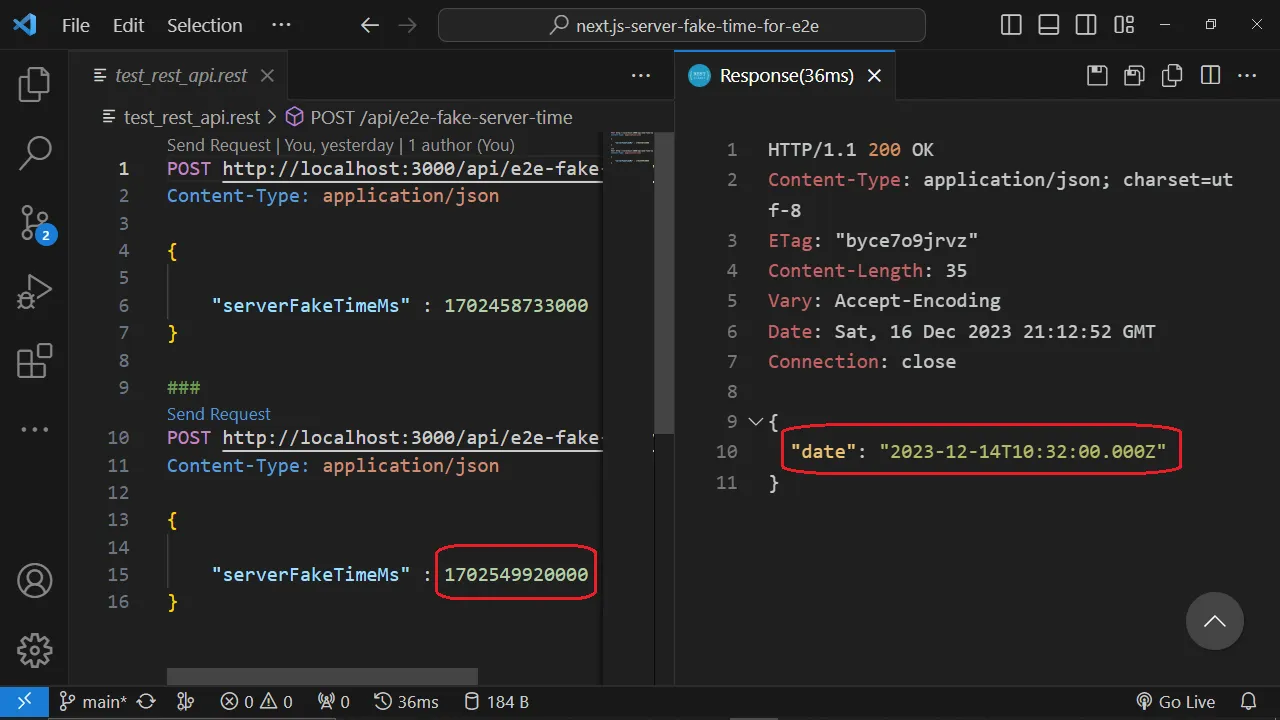
Invoke the API using rest client plugin
test_rest_api.restCall the fake time API with 13/Dec/23 - Wednesay
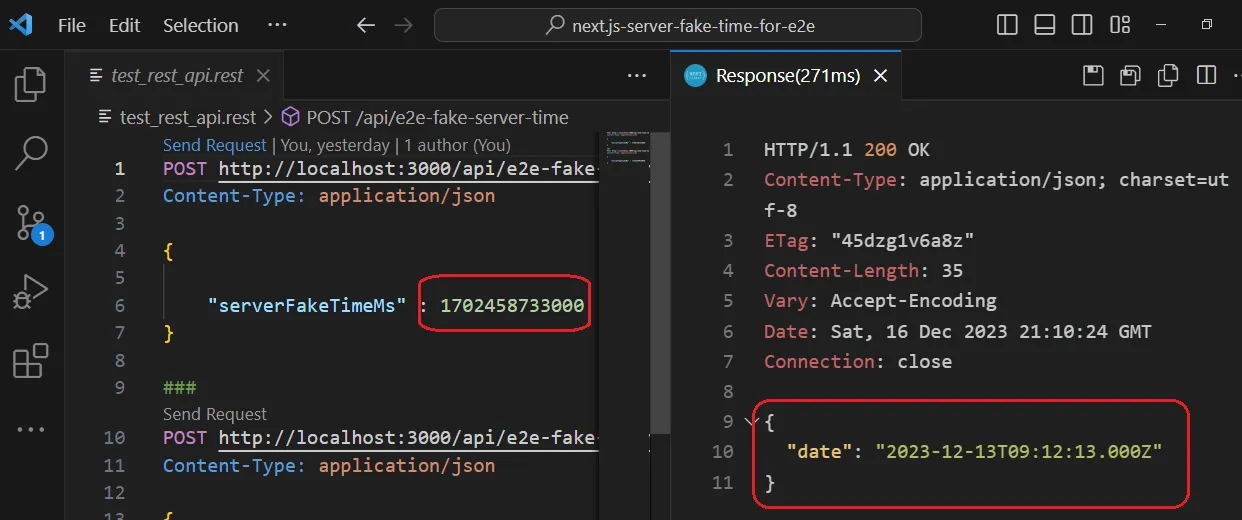
Call the fake time API with 14/Dec/23 - Thursday
Installation
pnpm i
Usage
Run the app using
npm run dev
Run the tests
npm test
E2E test using puputeer
The following is one test ,all the other tests are in E2e tests : test/e2e.test.ts
let browser: Browser;

beforeEach(async () => {
  browser = await puppeteer.launch({ headless: "new" });
});

afterEach(async () => {
  await browser.close();
});

test("sale day is true for wednedsay", async () => {
  const page = await browser.newPage();
  // --- force sale day wedenesday 1702458733000 --> 13/12/23
  const body: IServerFakeTime = {
    serverFakeTimeMs: 1702458733000,
  };
  const baseUrl = "http://localhost:3000";
  const url = `${baseUrl}${InternalRelativeApi.E2eFakeServerTime}`;
  await axios.post(url, { ...body });
  await page.goto(baseUrl);
  await page.click(".get-info");
  const val: string = await page.$eval(
    ".sale-day",
    (elem) => (elem as HTMLParagraphElement).innerText
  );
  expect(val).toBe("true");
});
Solution Scope
The context of this post is faking time on a next.js server for an e2e test. However, the core design here is faking time using sinon.js via REST API ,and this can be applied to- Any server based javascript \ typescript e.g. node or express
- not only e2e, currently i don't have good use case, but it may also be used in a production server (implement at your own risk)