How to Reduce CSS File Size for Better Web Performance
Table of Contents
The Relation Between CSS File Size and Web Performance
There are two main factors :Download Time
Given a throughput rate, the smaller the CSS file, the quicker the browser can download it from the server.Page Load Speed
Low-priority scripts, for example, might take time to download, but the browser does not require them to render the page. However, the user can see the page only after the browser renders it. Rendering relies on CSS files, and this issue, referred to as render-blocking, also applies to JavaScript filesHow to Reduce the CSS File Size
- purgeCSS
- assets compression (gzip)
Done by default by next.js for assets served to the browser. check gzip in next.js
The browser also supports gzip check developer.mozilla.org
CSS Files vs CSS in JS - performance-wise
Browsers are optimized to use CSS files, so CSS files look better for performance
CSS in JS has js code, which also contributes to the performance penalty
To solve the global scope issue, you might use CSS modules
Improve Performance for a Specific Use Case
The use case is using a navbar with a react-bootstrap package. We have a few options :- Improve as is --> problematic purgeCSS-wise because react-bootstrap uses bootstrap classes as variables, making it complicated. You can use safelisting as done blog post removing-unused-css-with-purgecss, but this needs to be more robust.
- Use only bootstrap without react-bootstrap --> Pros: purgeCSS can identify better + less code without the package. Cons: require code change from react-bootstrap to bootstrap
- Use CSS in js, e.g., MUI ---> Con: this is less preferred, performance-wise
Of the three options, I choose to go with the second option - bootstrap. I am also using CSS modules that handle the CSS global scope
Size of Reduced CSS File
bootstrap.min.css is 228KB while bootstrap-with-purgecss.css (check bootstrap/dist/css/bootstrap-with-purgecss.css after build) is 18KB thus X12 smaller !!!
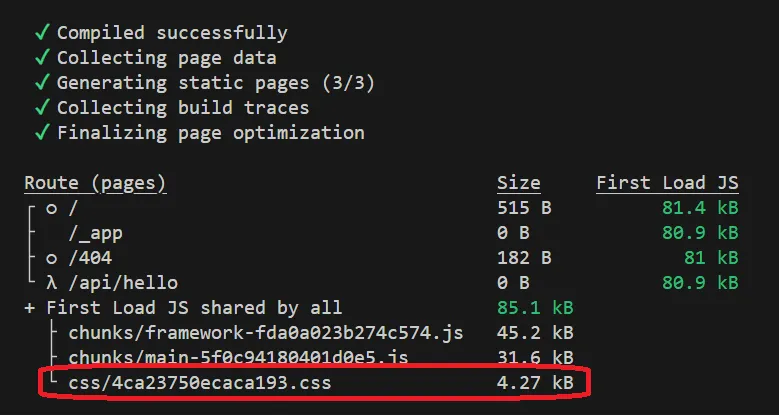
Following the build phase, you see css/4ca23750ecaca193.css 4.27 kB, which is the total CSS file, and this is the result of next.js gzip
How to Measure Web Performance
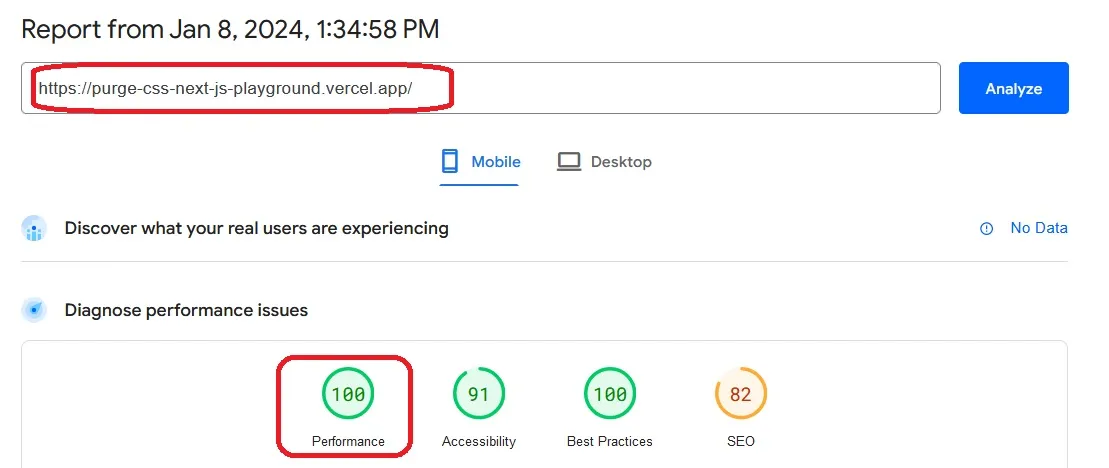
Page Speed InsightFinal performance score - 100. You can not get better
How to Analyze Web Performance
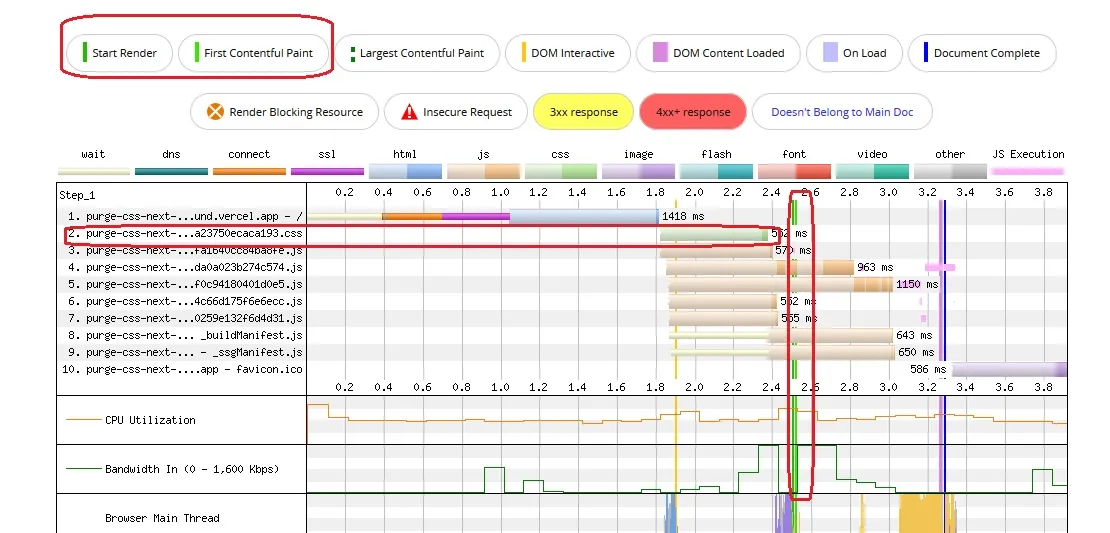
Web Page TestRender (in green) does not start (render-blocking) until the CSS is downloaded and processed by the browser.
Use npm Scripts pre \ post
Npm scripts pre \ post are part of package.json. The prebuild script will automatically execute before the build script
use "postbuild" script if you want to invoke a script automatically after the build script
"prebuild": "node scripts/remove-.next.js && npm run build-css-with-purgecss-cli",
"build": "next build",
In general, if you want to invoke a script before a script name script1, you name it "prescript1", and the same goes for the post via "postscript1"
npm per \ post scripts work out of the box with npm
using pnpm, you need to add a .npmrc file on the project root(check how-to-fix-post-pre-build-pnpm)
enable-pre-post-scripts=true
Repository
This is a POC project for using bootstrap , purgeCSS , gzip and pre scriptProduction website
At www.nathankrasney.com , I am using pre-script, purgeCSS, and bootstrap. I am using next.js, so gzip is done in build time on the CSS files out of the box by next.js
Feel free to check the performance of my website pages using Page Speed Insight. Note that there are fluctuations between sampling, so you can check a few times or use another way, as described in my blog post How to Automate Page Speed Insight Score>
References
- 'Removing unused CSS with PurgeCSS', Antonello Zanini Jun 24, 2023
- npm docs - Pre & Post Scripts
- 'How to fix "postbuild" and "prebuild" not working with pnpm?', David Dias, Jul 30, 2022
- 'CSS vs. CSS-in-JS: How and why to use each', Rahul Chhodde, Nov 17, 2022
- "Why We're Breaking Up with CSS-in-JS", Sam Magura, Oct 16, 2022