How to Automate Page Speed Insight Score
What is page speed insight and score
The following is the result you get after you navigate to https://pagespeed.web.dev/enter a page url e.g. https://www.nathankrasney.com/ and click tha Analyze button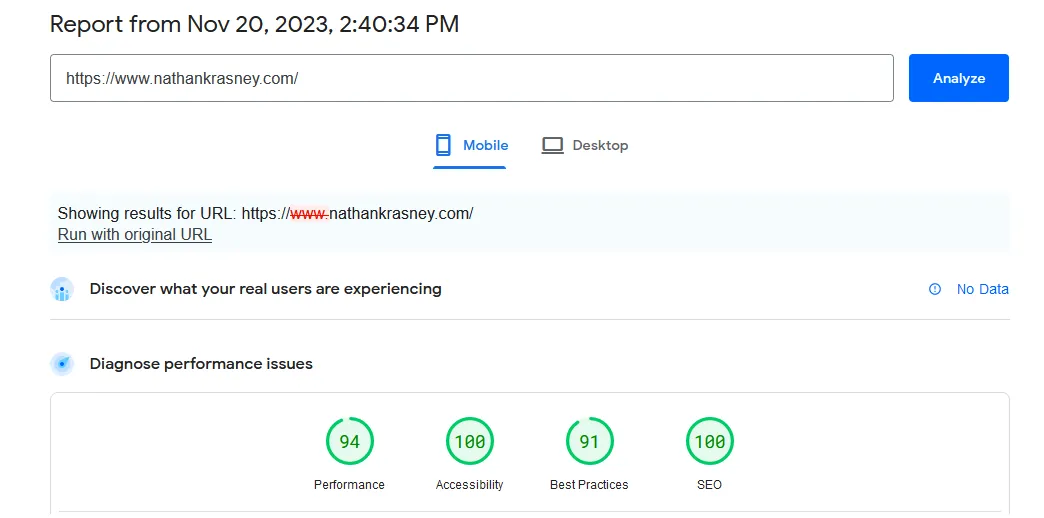
Figure : https://pagespeed.web.dev/
PageSpeed Insights
Here is what you need to know about PageSpeed Insights and what it measures.
Tool by Google
PageSpeed Insights is a tool provided by Google to assess the performance of web pagesAnalysis for Mobile and Desktop
It evaluates web pages for both mobile and desktop devices, providing insights into their loading speed and user experiencePerformance Score
The performance score summarizes how well your page performs on a simple scale.
0-100 Scale
PageSpeed Insights assigns a performance score ranging from 0 to 100, indicating the webpage's speed and overall performance.Score Categories
Scores are categorized as Good (90-100), Needs Improvement (50-89), or Poor (0-49), helping website owners understand their page's performance relative to optimization best practices.Metrics Evaluated
The score is based on several core web performance metrics.
Key Metrics
The tool considers various metrics such as First Contentful Paint (FCP), Largest Contentful Paint (LCP), Cumulative Layout Shift (CLS), and Total Blocking Time (TBT) to assess and provide recommendations for improving webpage performance.Motivation for page speed insight score
Improving your page speed score benefits your site in three key areas.
User Experience Enhancement
A better score directly translates to a better experience for your visitors.
Faster Loading Times
Improving the PageSpeed Insights score results in faster loading times for web pages, enhancing the overall user experience.Reduced Bounce Rates
Users are more likely to stay and engage with a site that loads quickly, leading to lower bounce rates.SEO and Search Rankings
Page speed is a Google ranking factor that affects how users find your site.
Search Engine Visibility
Google considers page speed as a ranking factor, and a higher PageSpeed Insights score can positively impact search engine rankings.Improved Discoverability
Websites with faster loading times are more likely to be prioritized by search engines, potentially increasing visibility in search results.Conversion Rate Optimization
Faster pages lead to more completed user actions.
Higher Conversions
Faster-loading pages contribute to a positive user experience, leading to higher conversion rates, whether that involves making a purchase, filling out a form, or other desired user actions.Why would you want to compute the score automatically
In short, it saves you time and effort
You can navigate to https://pagespeed.web.dev/ insert a url and wait for about 15 sec. if you have 10 pages to check you need to wait at least 150 sec, not including the time it takes you to enter each page URL
But by using the automation tool you can do it 3 times faster and in one go
Which API i am using
Google provides an apiHow did i get the api key
Navigate to get-started#APIKey and click on the button "Get a Key"A repository you can clone and tweak
github repository. The tag for the time of this post is 0.26Result output
Following are two run 5 minutes apart and there are some deviations e.g for the home page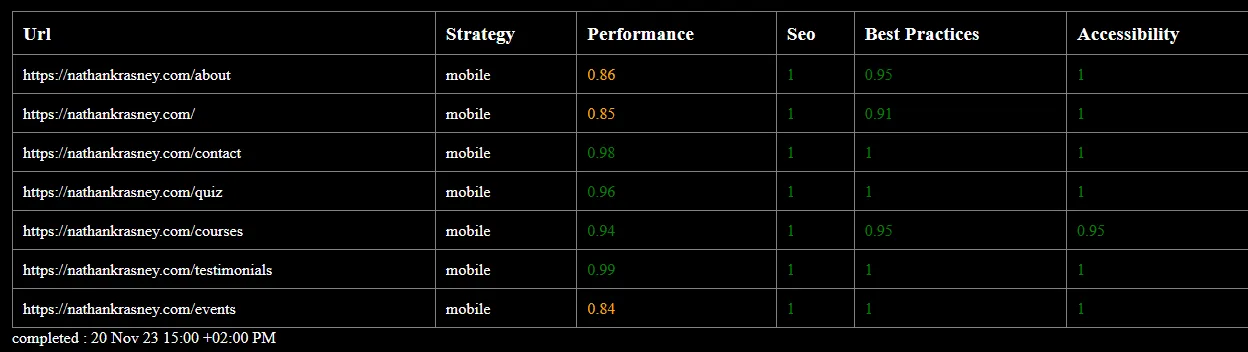
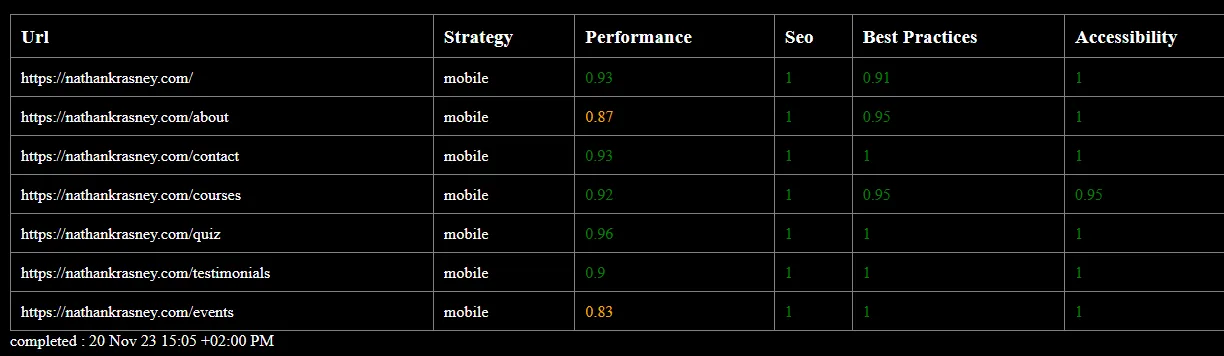
Figure : Page speed insight score 2 (after 5 minutes)
How can you tweak it yourself
navigate to data/infos.ts and change according to your needs
const baseUrl = "https://nathankrasney.com";

const tabs: string[] = [
  "/",
  "/about",
  "/contact",
  "/courses",
  "/quiz",
  "/testimonials",
  // "/blog",
  "/events",
];

const catChosen = {
  performance: true,
  accessibility: true,
  bestPractices: true,
  seo: true,
};

const strategy = StrategyGoogleApi.mobile;