How to Use Object.groupBy in Javascript
Table of Contents
What is Object.groupBy
The Object.groupBy() static method groups the elements of a given iterable, such as array \ Map, according to the string values returned by a provided callback function. The returned object has separate properties for each group, containing arrays with the elements in the group
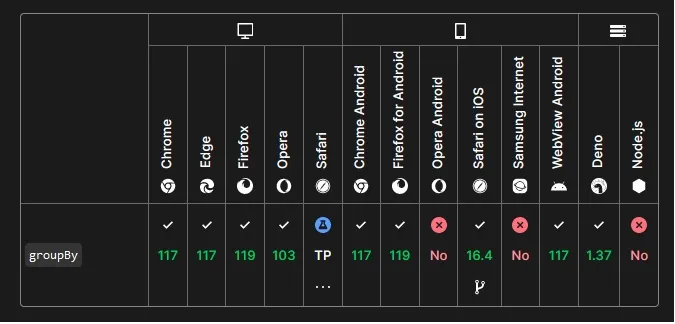
Browsers started supporing Object.groupBy by sep 2023 check browser compatibility
When Should You Use Object.groupBy
This method should be used when strings can represent group names. If you need to group elements using a key that is some arbitrary value, use Map.groupBy() instead
Sample1
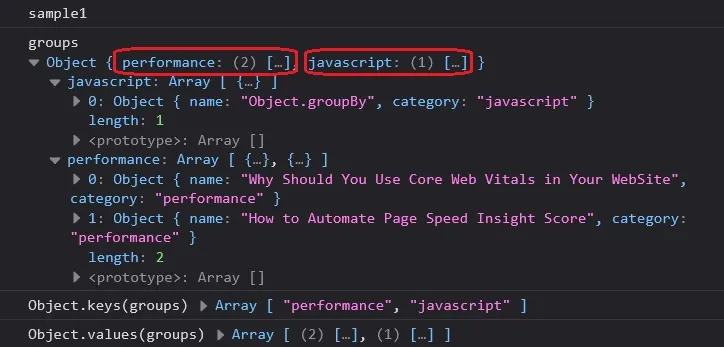
In this example, we group an array of blog posts by category and log the groups, keys, and values.
source code
source code - sample1()export function sample1() {
const posts = [
{
name: "Why Should You Use Core Web Vitals in Your WebSite",
category: "performance",
},
{ name: "Object.groupBy", category: "javascript" },
{
name: "How to Automate Page Speed Insight Score",
category: "performance",
},
];
/_
--- group by category : javascript , performance
--- groups keys are categories and value are the original object
_/
const groups = Object.groupBy(posts, ({ category }) => category);
console.log(groups);
console.log(Object.keys(groups));
console.log(Object.values(groups));
}
output
Sample2
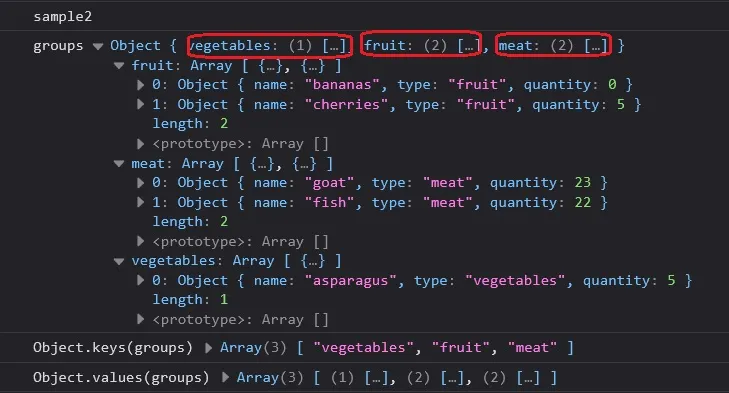
In this example, we group an array of inventory items by their type property: vegetables, fruit, and meat.
source code
source code - sample2()export function sample2() {
const inventory = [
{ name: "asparagus", type: "vegetables", quantity: 5 },
{ name: "bananas", type: "fruit", quantity: 0 },
{ name: "goat", type: "meat", quantity: 23 },
{ name: "cherries", type: "fruit", quantity: 5 },
{ name: "fish", type: "meat", quantity: 22 },
];
/_
--- group by type : vegetables , fruit , meat
--- groups keys are types and value are the original object
_/
const groups = Object.groupBy(inventory, ({ type }) => type);
console.log("groups", groups);
console.log("Object.keys(groups)", Object.keys(groups));
console.log("Object.values(groups)", Object.values(groups));
}
output
Sample3
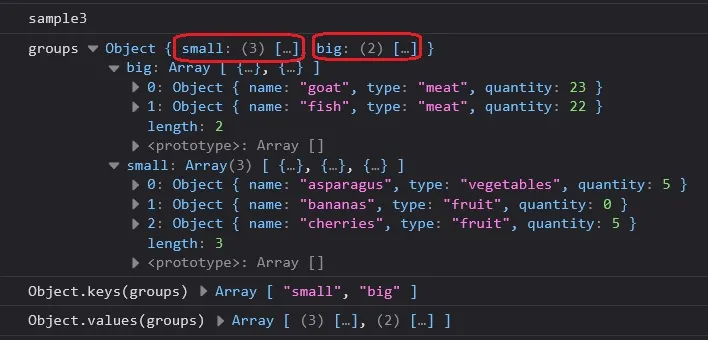
In this example, we group inventory items using a custom callback that classifies them as "big" or "small" based on quantity.
source code
source code - sample3()export function sample3() {
const inventory = [
{ name: "asparagus", type: "vegetables", quantity: 5 },
{ name: "bananas", type: "fruit", quantity: 0 },
{ name: "goat", type: "meat", quantity: 23 },
{ name: "cherries", type: "fruit", quantity: 5 },
{ name: "fish", type: "meat", quantity: 22 },
];
/_
--- group by inventory : big , small
--- groups keys are quantity based and value are the original object
_/
const groups = Object.groupBy(inventory, ({ quantity }) => {
return quantity > 5 ? "big" : "small";
});
console.log("groups", groups);
console.log("Object.keys(groups)", Object.keys(groups));
console.log("Object.values(groups)", Object.values(groups));
}
output
Browser Comatability 1-Dec-2023
Does it Work in node.js
node.js does not support it out of the box. you can use Polyfill of Object.groupBy in core-js
Node.js sample
source node.js Object.groupBy polyfillimport "core-js/features/object/group-by.js";
const posts = [
{
name: "Why Should You Use Core Web Vitals in Your WebSite",
category: "performance",
},
{ name: "Object.groupBy", category: "javascript" },
{
name: "How to Automate Page Speed Insight Score",
category: "performance",
},
];
const groups = Object.groupBy(posts, ({ category }) => category);
console.log(groups);